In a previous post I wrote
about the Kubernetes networking model and how it uses iptables to create a
Service abstraction allowing for simple service discovery and stable endpoints.
In this post I want to continue that train of thought and write about how
Kubernetes manages inbound (Ingress) and outbound (Egress) traffic.
This post focusses on Google Cloud Platform and how it manages traffic, therefore not all information discussed will necessarily apply to other cloud platforms or network topologies.
The Egress
Accepting forwarded packets via internal IP devices allows LAN nodes to communicate with each other; however they still cannot communicate externally to the Internet.
To allow LAN nodes with private IP addresses to communicate with external public networks requires internal addresses to be translated to addresses of the external device (or gateway).
Under the Google Cloud Platform topology each node has its own internal address and may be given an external address if necessary. Both the internal and external addresses are assigned to the same NIC and managed through a 1:1 Network Address Translation (NAT).
When a node in a Kubernetes cluster wants to make a request to an external public network the 1:1 NAT will take the internal source address and translate it to the machines external address. Then when packets are returned the NAT reverses the process. There are no surprises here and demonstrates how NAT is suppose to work. This is all hidden from the user but can be a problem for Kubernetes.
Taking this idea further we can explore what happens when a Pod make a request to an external public network. As mentioned in my previous post the Kubernetes networking model demands a flattening of the IP address space, allowing any Pod on the same cluster to communicate with any other Pod. However the address of the Pod is not the same address as the node on which it is running. Therefore when it sends packets destined for another network the NAT drops it as it is unable to translate an address it does not know.
To solve this issue Kubernetes makes further use of iptables, configuring IP
masquerading. When a packet passes through the iptables rules it has its
source address altered to the nodes internal address allowing it to now be
passed through the NAT and sent outbound to the external public network for
which it was destined. Equally when a packet is returned the iptables rules
are able to alter the destination address of the packet to that of the Pod.
By logging onto any one of the nodes in the cluster we are able to see the
iptables rules that are responsible for this behaviour.
sudo iptables-save
-A POSTROUTING ! -d 10.0.0.0/8 -m comment --comment "kubenet: SNAT for outbound traffic from cluster" -m addrtype ! --dst-type LOCAL -j MASQUERADE
This rule basically states that any packet not destined for any host on the
10.0.0.0/8 (the default VPC of a Google Cloud Platform project) or
127.0.0.0/8 network address ranges will be masqueraded.
The Ingress
Typically a Service defined within a cluster will be given an address that is only internally routable. That means only traffic within the same cluster may be able to communicate with the Service. When any external traffic destined for the cluster reaches the gateway it will likely be dropped.
Instead Kubernetes defines the Ingress resource that provides an abstraction for an ingress controller that may provide externally-reachable addresses, load balance traffic, terminate SSL, offer name based virtual hosting, and more. Below we can see the difference between a Service that is not publicly routable and one that is sat behind an Ingress.
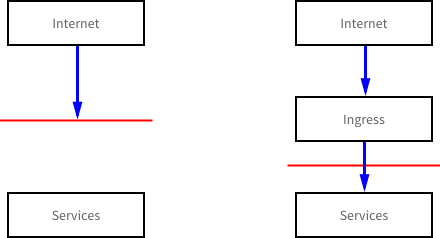
The Ingress resource on its own has no effect on the cluster. Instead the resource must be satisfied by an ingress controller that is ultimately responsible for routing the traffic. This may come in the form of an nginx reverse-proxy, HAProxy, or some implementation of a load balancer.
On Google Cloud Platform the default implementation of the ingress controller is
to provision a Google Cloud Load Balancer (GCLB -
L7 HTTP load balancer).
It should be noted that the GCLB ingress controller requires that the Service it
sits in front of exposes a node port. Therefore I have updated the Service from
my previous post to use the NodePort Service type instead of the ClusterIP
type.
kubectl -n myapp get services
NAME      TYPE        CLUSTER-IP     EXTERNAL-IP   PORT(S)        AGE
api       NodePort    10.7.241.228   <none>        80:32561/TCP   33d
What this shows is a Service that may be reached within the cluster with the
address 10.7.241.228:80 or externally via the node port 32561 using the
external addresses of one of the nodes.
Now when an Ingress is created it is issued a public IP address that can be used
to access the Service. To demonstrate this I have created an Ingress to sit in
front of the Service we’ve been using. The kubectl command prints out the
Ingress details.
kubectl -n myapp get ingress
NAME      HOSTS     ADDRESS          PORTS     AGE
client    *         35.190.229.182   80        1d

kubectl -n myapp describe ingress/api
Name:             api
Namespace:        myapp
Address:          35.190.229.182
Default backend:  api:80 (10.4.1.14:9000,10.4.2.19:9000)
Rules:
  Host  Path  Backends
  ----  ----  --------
  *     *     api:80 (10.4.1.14:9000,10.4.2.19:9000)
Annotations:
  forwarding-rule:        k8s-fw-myapp-api--c6a6b5b8b78b3c96
  target-proxy:           k8s-tp-myapp-api--c6a6b5b8b78b3c96
  url-map:                k8s-um-myapp-api--c6a6b5b8b78b3c96
  backends:               {"k8s-be-31444--c6a6b5b8b78b3c96":"HEALTHY"}
Events:
  Type    Reason   Age                 From                     Message
  ----    ------   ----                ----                     -------
  Normal  Service  30s (x149 over 1d)  loadbalancer-controller  default backend set to api:32561
An Ingress is probably the most powerful way to expose a Service to the wider world, especially if exposing multiple Services that all talk the same L7 protocol. You only need to pay for a single load balancer if using the GCLB